See Your Racing Line in F1 Telemetry

F1Laps now shows the racing line you drove around the track alongside your lap telemetry. Open a compatible lap and you can see where the car was placed on corner entry, at the apex and on exit—not just how fast it was going.
Move the lap-distance slider and the track markers, speed, throttle, brake, gear and chart cursors all follow the same point in the lap. Compare two compatible laps and both racing lines appear on the same circuit, which makes it much easier to explain a time difference. A wider entry, missed apex or compromised exit is visible straight away.
F1 racing line telemetry is now available to Champion members for newly captured F1 23, F1 24, F1 25 and F1 26 laps on supported tracks. No extra recording step or reference lap is required: the telemetry app captures compatible position data automatically while you drive. Older laps won't show the new map because they don't contain these position samples.
What the racing line shows
For each lap, the racing line view plots the game's position data on a track map. It includes:
- The line your car took around the circuit, shown in bright blue
- Start/finish and sector markers so you can orient yourself quickly
- Speed, throttle, brake and gear values at the selected point
- A synchronized car marker shared with the minimap and telemetry charts
- Zoom and pan controls for a closer look at individual corners
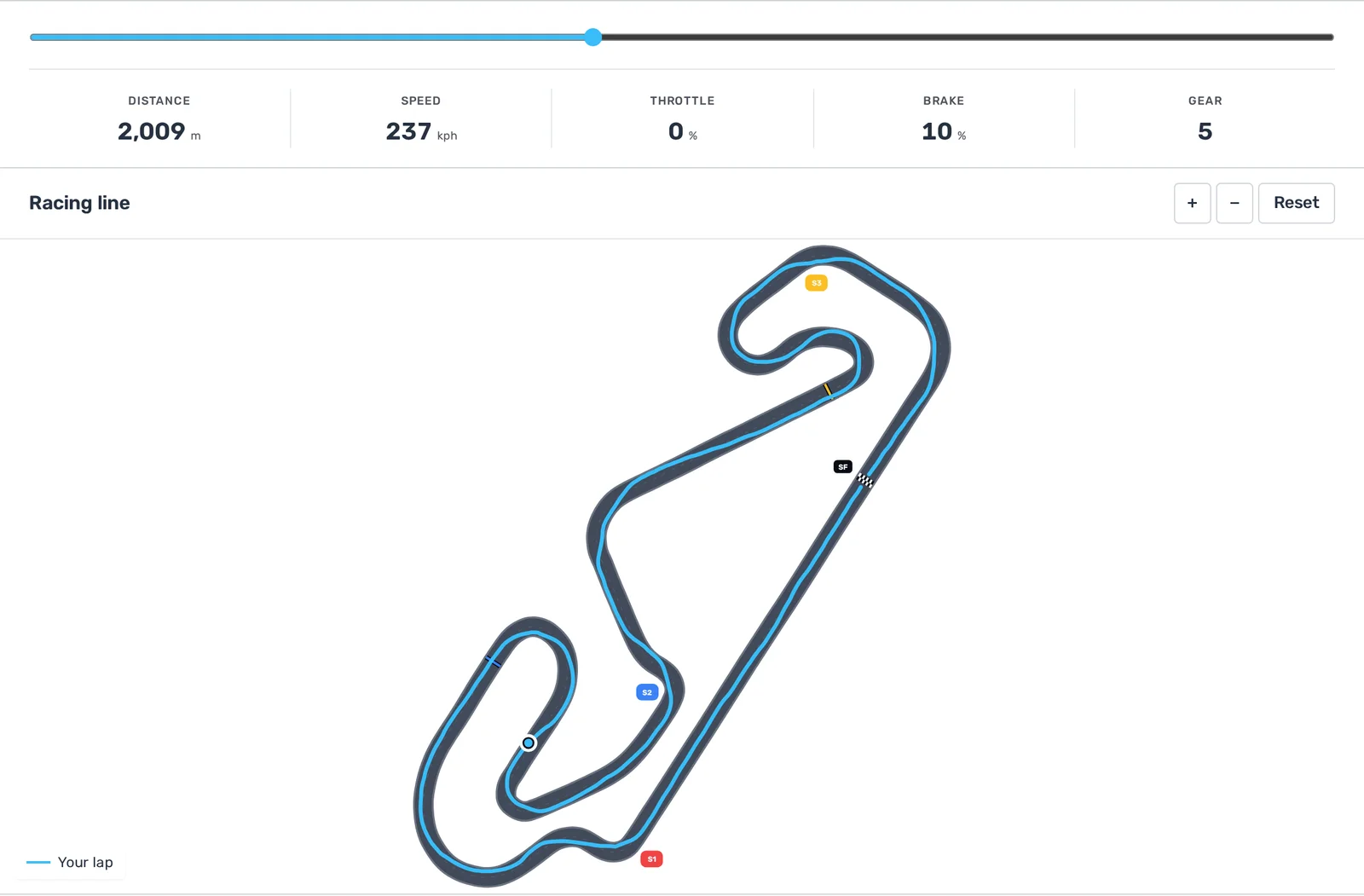
The track edges are there as a visual guide, while the blue line comes from the world-position data recorded during your lap. You don't need to drive a separate reference lap or set up a track map yourself.
Compare two racing lines
The differences are clearest when you compare two laps. Your lap stays blue and the comparison lap appears in amber on the same track. That lets you see whether the other driver:
- opened a corner with a wider entry
- clipped an earlier or later apex
- used more of the track on exit
- positioned the car differently through a sequence of corners
The map stays synchronized with the lap comparison telemetry. Move the slider to a corner and you can check the racing line, speed trace and pedal inputs at the same point instead of trying to match them by eye.
How F1Laps captures your racing line
The game sends car-position data through UDP Motion, and F1Laps records it automatically through the telemetry app. There is no extra recording step and no new setting to enable. Start the telemetry app, drive as usual and compatible new laps will include the data needed for the map.
Position capture is enabled for every F1Laps user. Free and Premium members see a preview, while Champion members can open the full interactive racing line. That means a compatible lap recorded after the rollout can be unlocked later if you upgrade.
Older laps do not contain the position samples, so they will continue to show the existing telemetry charts without a racing line. The feature currently supports newly captured laps from F1 23 through F1 26 on tracks with a compatible map.
Racing line telemetry FAQ
Can I see racing lines from old laps?
Only laps captured after racing-line position recording was enabled contain the required data. Older laps keep their existing telemetry charts but cannot have a racing line reconstructed.
Can I compare two racing lines?
Yes. With Champion telemetry access, choose another compatible lap in the usual comparison menu. Your line appears in blue and the comparison line appears in amber.
Do I need to record a reference lap for each track?
No. F1Laps uses the track map already built into the platform and aligns the position data from your lap automatically.
See your next lap differently
Telemetry charts show what the car was doing. The racing line map shows where you placed it.
Start a Champion trial and record a new lap to see your racing line.