See Which Driver Assists You Used Per Lap
Ever looked at a quick lap and wondered how much of it was you and how much was the game? Traction control, ABS, the racing line, they all change how a lap was driven. Until now F1Laps didn't show which ones were on. That's fixed.
F1Laps now records the driver assists used on every lap and shows them right on the lap detail page, and on public leaderboard laps too. You see exactly what was active, including the level, not just on or off.
What you'll see
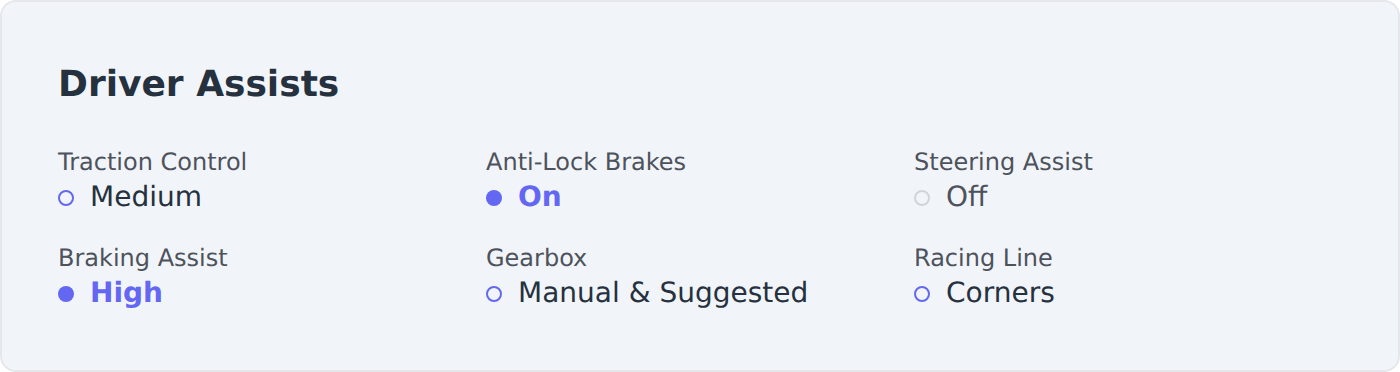
Every lap now has a Driver Assists section listing six assists with their exact setting:
- Traction Control: Off, Medium, or Full
- Anti-Lock Brakes: Off or On
- Steering Assist: Off or On
- Braking Assist: Off, Low, Medium, or High
- Gearbox: Manual, Manual & Suggested, or Automatic
- Racing Line: Off, Corners, or Full
This goes further than the in-game Time Trial leaderboard, which only shows three assist icons and hides the level. F1Laps shows all six with the level spelled out, so "Traction Control: Medium" reads differently from "Full". A small dot next to each value makes it scannable: filled means fully on, an outline means partial, faint means off. Laps from before this update, and F1 2020/2021 laps, show as "not available" rather than guessing.
Filter your own laps by assist
On your My Laps page, the More filters menu now has a dropdown for each assist. Set any of them to On, Off, or a specific level, and combine them however you like. Want only your laps with the racing line on but traction control off? Two clicks.
It's neutral, not a judgement. Assists generally make you slower, so a fast lap with assists on is impressive in its own right. The filter just lets you compare like with like.
Why it matters
Assists are the biggest hidden variable when you compare lap times. Two drivers can post the same time at Silverstone, but if one ran full traction control and the other ran none, those aren't the same lap.
Seeing the assists on every leaderboard entry and on your own laps makes comparing laps honest. It's especially useful in Time Trial, where a personal best set after you turned an assist off should show that, not the setting you warmed up with. F1Laps stores the assists per lap, so each lap is labelled with what was actually active when you drove it.
The assists are captured automatically by the telemetry app, the same way your lap times, tyre wear, and setups are. Nothing to turn on. Drive, and your laps show the full picture.